
Learning that feels like playtime.
Math by grade, a chess school, Meet AI and more — for kids 3–12, read aloud in their own language, with no ads and nothing to sign in to.
Built to include the kids other apps leave out.
Answer by voice
Kids who can't read yet can just say the answer, in their own language.
Read aloud
Questions and prompts can be spoken aloud, so reading is never a barrier to playing.
Relaxed mode
One switch removes every timer for kids who find time pressure stressful.
Meet AI
An AI friend explains what AI is and how to ask it clearly, then kids code a robot — AI as a tool, used well.
Chess school
Ten chapters from the first move to tactics, then games against ten friendly robots, from easy to tricky.
50+ languages
From Tiếng Việt and English to Hindi, Arabic, Swahili and Khmer — numbers read the way each language says them.
Certificates
Finish a chapter and win a certificate with your child's name on it, ready to share with the family.
No ads, no accounts
No advertising of any kind, and nothing to sign in to. New games and packs are what we sell — never your child’s attention.
No sign-in needed
Jump straight into a game — no account, no setup, nothing to fill in first.
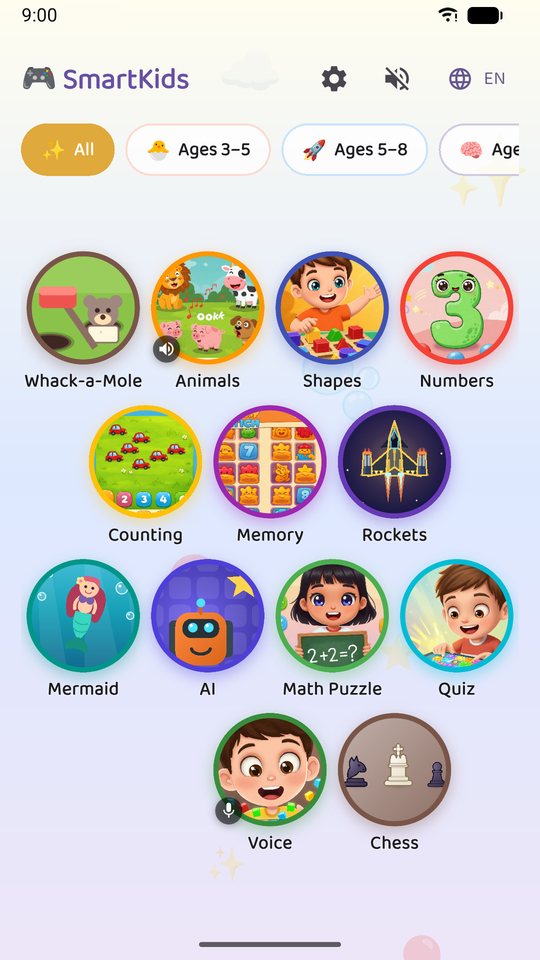
A game for every stage, from first taps to times tables.
- 🐘 Animal Sounds
- 🔺 Shapes
- 🧮 Counting
- 🃏 Memory
- 🔢 Numbers
- 🔨 Whack-a-Mole
- 🧜 Pearl Diver
- 🚀 Star Pilot
- ❓ Quiz
- 🧩 Math Puzzle
- ♞ Chess School
- 🤖 Meet AI
- 🗣️ Voice Commands
On the TV, with the remote you already have.
Hootle is a real Android TV and Google TV app: install it from Google Play on the TV and every game plays with the remote. On a Windows PC it plays with a mouse, keyboard or touch screen. You can still mirror a phone or tablet to any TV:
Android
Open Quick Settings, tap Cast / Screen cast, then pick your Chromecast, Google TV, or a cast-capable TV.
iPhone / iPad
Open Control Center, tap Screen Mirroring, then pick your Apple TV or an AirPlay-capable TV.
No ads. No accounts. Voice and camera stay on the device.
The app shows no advertising at all. Voice answers and camera-motion play are processed on the device, in real time, and the app never records or stores them. No account or sign-in is required to play.